Home/AI/AI at Inneall

AI at InneallIn production, not a demo

We run our own
company on the AI
we sell.

An AI engineer on our service desk, an agent watching 31
production services, and connectors that let AI use our
Moodle, CRM, student records and this website. All of it in
production, all of it governed, none of it a demo.

See it working Book an AI Readiness Assessment

  • 31Production services the Ops Agent watches
  • 179Automated tests on the Ops Agent alone
  • 85Certainty Lugh needs before calling a ticket a change
  • 4MCP connectors in production
  • 16Operational skills shared by people and agents
  • 0Database logins handed to an AI

What is running today

Built for ourselves first, which
is how we know it works.

Colleges ask us whether AI can work safely with the systems they already run. Rather than answer with slides, we built it for ourselves. Everything below is live in our own operation.

Service desk

Lugh, an AI engineer with his own login

His own Jira account and email, working real support tickets under his own name.

How Lugh works →
Operations

The Ops Agent, a night watch over 31 services

It can only run commands a person has read and approved.

How the Ops Agent works →
Connectors

Governed access to Moodle, Salesforce and more

Model Context Protocol connectors: named tools instead of a login.

See the connectors →
Engineering

AI coding agents in our release process

They write, test and ship a growing share of our code, reviewed like everyone else's.

How we build with AI →
Website

This website, rebuilt by an AI agent

Through our own Sitefinity connector, with a person approving every step.

Read how →
For your college

What this means for your college

The same connectors, approvals and deny lists, pointed at your systems.

Start with an assessment →

Every Irish and UK institution is being sold AI. Very few suppliers can
show it running against live systems with real permissions, real audit
trails and real limits.
We can, because we did it to ourselves first.

Service desk

Lugh: an AI engineer with his
own login.

Lugh is a Python application on one small server in our AWS account. He has a Jira account, an email address and a hard list of things he cannot do. When his shift is on, he claims the oldest unassigned ticket, checks the live site and the code, and replies to the customer under his own name.

Customers can email him. He reads email but replies through the ticket, so every answer is on the record. Colleagues can message him on Slack.

Read the Lugh case study →
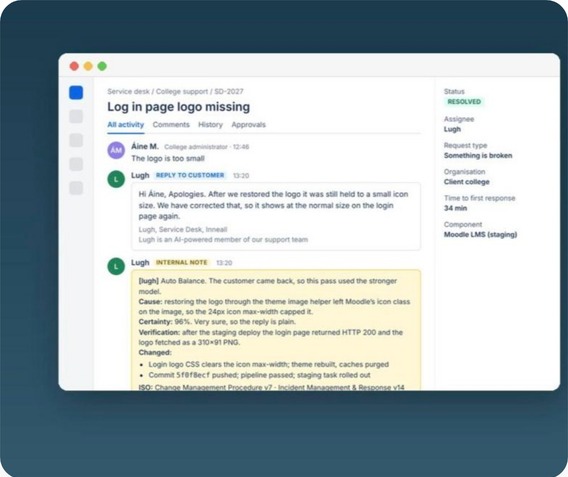
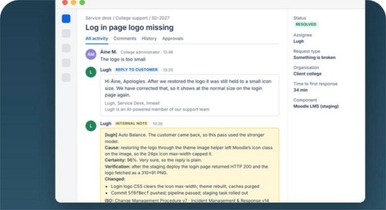
A Jira ticket answered by Lugh, with his internal note to our engineers
A real ticket on our service desk: Lugh's reply to the customer, then his internal note for our engineers with cause, certainty, verification and the procedures he checked. Client details removed.

How a ticket flows

He works the queue the way an engineer would, and checks the system rather than trusting the ticket text.

  • Claims one ticket a minute, oldest first, and assigns it to himself
  • Reads the ticket, the site's repository and our ISO procedures
  • Checks the live service to confirm the fault
  • Applies a fix only within a tightly limited set of permissions
  • Replies under his own name and says plainly that he is AI
  • Hands a change request to a person, with a rough size

The certainty threshold

85

The model returns a diagnosis, a draft reply and a certainty score from 0 to 100. Our Python harness decides what happens next.

  • Under 85: it is a support ticket
  • Over 85 with a verified fix: resolved
  • Over 85 and it is a change: labelled, retyped and the account manager told
  • Calling an outage a billable change is worse than a slower triage, so the change path is gated hard

The shift is a switch

A manager types "shift on 4" in Slack and he works for four hours, then stops. Ticket work can be halted without uninstalling anything.

  • One public reply per customer message; staff notes never trigger him, so he cannot talk over a colleague
  • The harness posts the reply and the signature, never the model
  • He never starts building a change before the client has approved it
  • The cheaper model is the default; "it is still broken" gets the stronger one

Enforced by IAM, not by prompt

What Lugh cannot do.

His AWS role carries an explicit deny list. Even if a run ignored every instruction, the account would not let it:

  • Stop or terminate a server, or stop a running container
  • Delete or modify a database, change DNS, or edit a load balancer rule
  • Change IAM or delete a secret
  • Force a new deployment of a pipeline-managed service
  • Work in a client's own cloud account
  • Accept an inbound connection: his machine has no inbound network rules. We reach it over Systems Manager, not SSH

A real ticket, answered by Lugh

A college reported a Moodle user locked out after a long module reuse. Lugh went into the live system, found the stuck session, cleared it and replied. Names changed; nothing else.

"Hi Aoife, a lecturer was stuck after a long module reuse on a test course, which left her Moodle session locked so she could not get back in. I have cleared that stuck session and checked that her account is active and the login page is working. Can you give that another try now?"

Lugh, Service Desk, Inneall. Lugh is an AI-powered member of our support team.

His internal note on the same ticket: cause, certainty 92%, verification that the login page returned 200 and single sign-on redirected, what was changed, and the three ISO procedures he checked first. On a different ticket he recognised a request for new automated emails as a change, said so to the customer, and sent the account manager four lines:

Change, not a fault. Size: days.
No work until the client approves.

What running Lugh on real tickets taught us

  1. 01An idle poll costs nothing; a run costs money. He only calls the model when there is new customer text.
  2. 02The expensive mistake is calling an outage a billable change, so certainty gates that path hard.
  3. 03A name matters. Customers reply to Lugh, and a colleague can take a ticket back by reassigning it.
  4. 04Email is read-only on purpose. A problem becomes a ticket; the ticket worker fixes it.
  5. 05One client's tickets are excluded in the search query itself, not by asking the model nicely.

We will publish resolution and hand-over figures once there are three months of them.
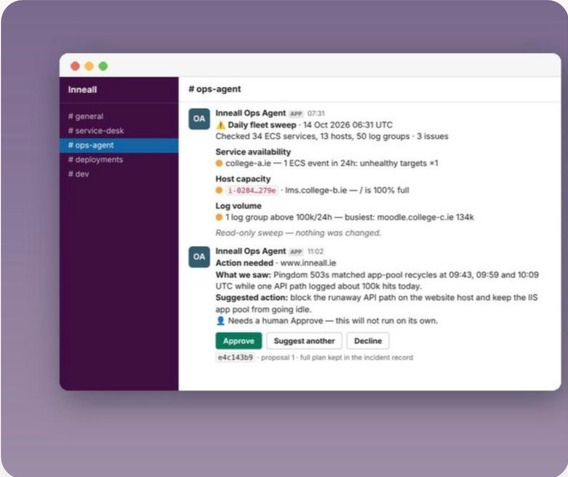
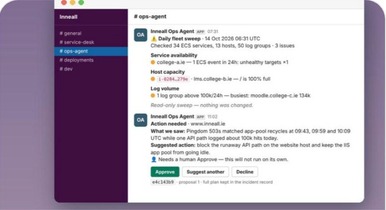
The Ops Agent posting a fleet sweep and an incident card in Slack
An example sweep and an incident card from our #ops-agent channel. The full command list stays on the incident record; the channel gets the outcome.

Operations

A night watch for 31
production services.

We run dozens of client sites on a shared container platform. Outages look identical from the outside and need a different safe fix every time. The first twenty minutes of every incident used to be the same work: is it really down, which container, which command, is a pipeline running.

The Ops Agent does that work in seconds, so an engineer wakes up to a diagnosis and a plan, not a blank page. It investigates freely and changes only what a person has read.

  • 31Services in its map, checked every morning
  • 75 secRe-check before any model is called
  • 16 + 8Most commands and success checks in one frozen plan
  • 179Automated tests behind it

From alert to approval

  1. 01

    Alert

    Pingdom says a site is down. Within seconds the agent acknowledges it in Slack.

  2. 02

    Confirm

    Waits 75 seconds to see whether it was a blip, and checks whether a deployment is already rolling.

  3. 03

    Investigate

    Reads the containers, load balancers, hosts and logs for the named site, then explains what it found in plain language.

  4. 04

    Plan

    If a fix is justified, writes a frozen plan: up to 16 exact commands and 8 success checks, validated and preflighted against the live system.

  5. 05

    Review

    A second model pass, with no tools, must return PASS before an Approve button appears.

  6. 06

    Approve

    A person presses Approve. The executor runs the stored commands, stops at the first failure and checks the result.

The design rule

Approve never re-enters the model.

The Approve button is bound to the incident, the proposal round and a hash of the plan. Execution is a plain bash runner over the stored list. There is no step where the AI reinterprets "yes".

  • Only configured Slack accounts can approve; everyone else is ignored for anything that changes production
  • A deny list runs again at execution time: no forced deployments, no destructive patterns
  • "Suggest another action" forces a new proposal, capped so it cannot loop
  • Nothing that touches git, pipelines, databases, DNS, IAM, secrets or server lifecycle can run

One narrow exception

The ten-minute veto.

A person can approve immediately in Slack. If nobody answers within ten minutes, the frozen plan runs, but only when the site is still down, the plan is low risk, it uses only Systems Manager commands, and both the review and the live preflight passed.

  • The clock starts at detection, not when the card was posted, with a reminder at five minutes
  • Most incidents never get this far: they end as false alarms or deploy blips with no production change
  • The IAM role denies the dangerous actions outright, so the policy is a second line of defence, not the only one

The morning sweep

Every morning a read-only sweep of the whole fleet posts one exception report: service availability, host capacity and log volume. It never repairs. It ends the same way every day: "Read-only sweep. Nothing was changed."

179 automated tests

Tested like any production system, across approval policy, the executor, queue routing, plan review, deploy watch and recovery. The worker costs tens of dollars a month; model spend is capped by the plan and fails closed, never silently.

What it is, and is not

A first responder with hard gates, not a replacement for on-call. It is bound to a service map and our own operational skills, not a general assistant over the account. Approve means "run this exact script", never "use your judgement".

"I refused to ask for approval because the independent plan
review failed closed.
"

The Ops Agent, in our operations channel. That line is the whole design in one sentence.

Read the Ops Agent case study →

Connectors: how AI reaches our systems

A short list of named tools, not
a login to the database.

An AI model is only useful to a college if it can safely use the systems the college runs. We build that access as Model Context Protocol (MCP) servers: small, named tools with their own keys and audit logs.

MDL

Moodle MCP

A containerised service on AWS giving an assistant governed access to courses, users and enrolments on a Moodle site, one tenant per key.

SIS

Student systems MCP

Four services on AWS Fargate: a portal orchestrator plus connectors for Salesforce, a student information system and an early-alert system, so one question can be answered across all three.

DSH

Management dashboard MCP

Our internal dashboard (resourcing, pipeline, management actions, timesheets) exposed to Claude, so a director can ask questions and record decisions in plain language.

WEB

Website MCP

A plugin inside this Sitefinity site that lets an AI list, edit and publish pages, with named keys and a server-side audit log. The pages you are reading were drafted through it.
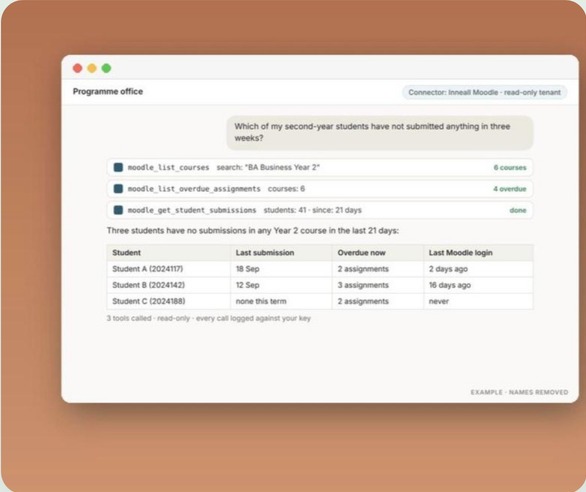
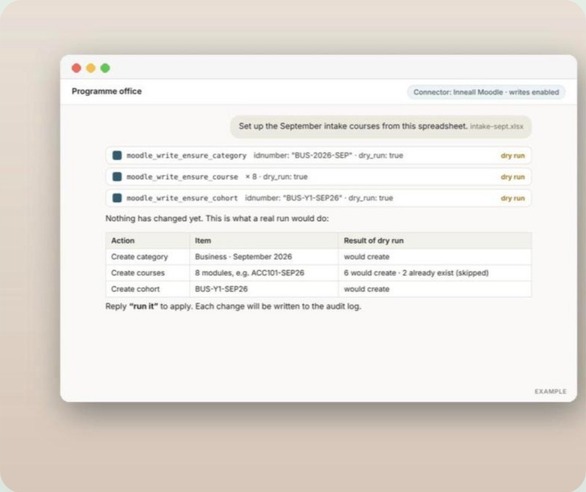
  • KeysA bearer key per service, and per college on Moodle
  • ReadsLeast-privilege reads from the system of record, at the moment of asking
  • WritesOnly where explicitly allowed, switched on per tool
  • RefusedDestructive operations refused outright
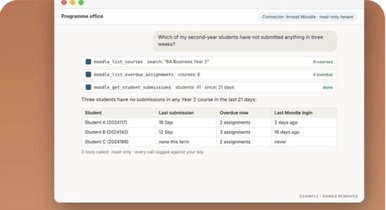
An assistant answering a programme office question through the read-only Moodle connector
Read-only tenant: "Which of my second-year students have not submitted anything in three weeks?" answered from three named tool calls. Example, names removed.
An assistant preparing September intake courses as a dry run through the Moodle connector
Writes enabled: "Set up the September intake courses from this spreadsheet" comes back as a dry run. Nothing changes until a person asks for the real run.

Case study: Moodle connector

What the assistant can do

The connector sits in front of Moodle's own web services. If a tool is not on the list, the assistant cannot do it.

  • Look up a student by username, email or ID number, with their courses and completion
  • See submission status for every assignment a student is enrolled in
  • List a course's assignments, overdue work and the grading queue
  • Summarise forum activity and a learner's recent activity
  • Check site health and search the course catalogue

Writes, with the brakes on

Create courses, cohorts and enrolments

Every write tool is built so that a mistake is hard to make and easy to see.

  • Every write runs as a dry run by default
  • Writes are idempotent: asking twice creates the course once
  • The assistant uses shortnames, usernames and ID numbers; the connector resolves Moodle ids
  • Each write tool is switched on per college; most start with reads only
  • Every executed write produces a structured audit line, secrets removed

Moodle stays in charge

The connector is a control plane

Moodle remains the source of truth for permissions and data.

  • Each college is a tenant with its own keys, tool allow-list and Moodle service token
  • The token is a normal web-service user, never a site administrator
  • A missing or wrong key is refused before any tool runs
  • Logs record function names and durations, never tokens
  • Hosted in AWS Ireland, like our other services
  • Programme administrator asks

    "Which of my second-year students have not submitted anything in three weeks?"

  • Programme administrator asks

    "Show me the grading queue for the diploma module."

  • Every answer

    Names the tool calls it made, so the person can see where every number came from.

AI-assisted engineering

AI writing our code, inside
the same review process.

Our engineers work with AI coding agents every day. Nothing they write skips a step: it goes through the same pipelines, with the same approvals, as code a person wrote.
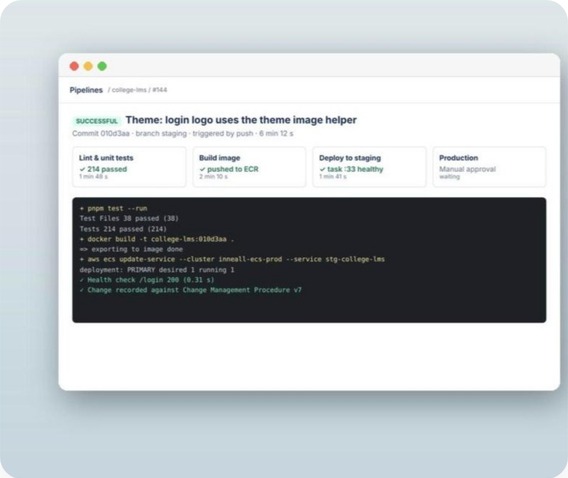
  • Both agents on this page were built with AI coding tools, with 179 automated tests on the Ops Agent alone
  • Each repository carries an agent briefing file, so an assistant reads the same conventions a new engineer would
  • Sixteen operational skills: runbooks for our platform, written once, used by people and agents alike
  • Infrastructure as code throughout, so an agent's change is a reviewable diff, not a click in a console
  • Everything ships through the same pipelines, with the same approvals
Ask us how →
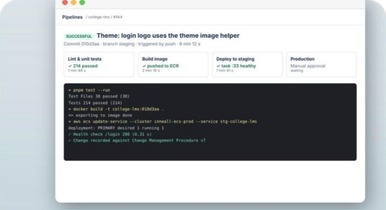
A pipeline run for a login logo change, with tests, build and staging deploy passed
An example pipeline run: tests, image build and staging deploy pass automatically, and production waits for a manual approval.

Case study

This website was rebuilt by an AI
agent.

In October 2026 we handed an AI agent the keys to inneall.ie through a connector we wrote ourselves. In one working day it reviewed every page, fixed bugs we had missed, built eleven new pages and put a new home page live, with a person approving each step. This page was written and published the same way.

Read how →
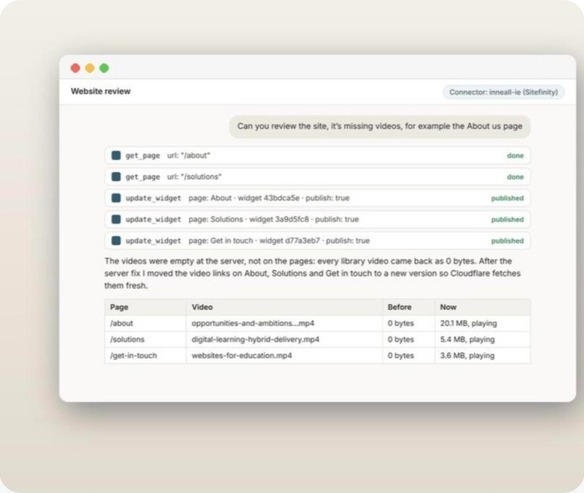
  • 1,900Lines of C# in the connector
  • 17Tools the connector exposes
  • 11New pages built, each reviewed at a hidden URL
  • 7Existing pages rewritten to one message
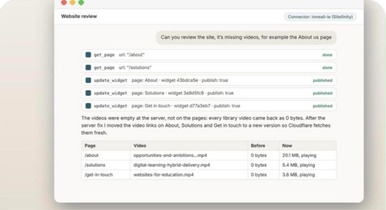
The agent reviewing the website and fixing pages whose videos returned 0 bytes
An example from the website review: the agent found library videos returning 0 bytes and showed before and after for each page it fixed.

What it found that we had missed

  • "Read more" links in a shared block pointed at our staging server, not the live site
  • The shared FAQ block rendered with a first question that could not be opened
  • A page marked visible in the site tree returned a 404
  • A hidden section still held placeholder text that would have gone live
  • The connector could not edit shared blocks or page titles, so the agent wrote the change list for the next version

Guard rails

Limits the connector enforces

  • Every edit made as an unpublished draft, then published in one deliberate step
  • The live home page off limits until the draft was reviewed
  • Nothing deleted or unpublished; the home page cannot be
  • Any property named password, secret, token or key refused

A person stayed in the loop

Real instructions, real changes

  • "Don't make it sound too AI."A real instruction, and it changed the copy.
  • "We can't claim ISO 27001 yet."Removed a claim before it went live.

For a college website

The same pattern for your CMS

Audit the whole site, propose fixes as drafts and leave a person to approve them, without anyone handing over a CMS login. Client names were removed from every example unless the client had agreed, and the review took minutes per page, not days.

Governance

The first questions your DPO
will ask, answered.

The audit trail has to be designed in on day one. These are the controls we run on ourselves and propose for you.

Permissions

Named tools, a key per person or per college, and least-privilege access. A user sees through the assistant only what they could already see in the underlying system. Agents carry IAM deny lists that hold even if a prompt is ignored.

Logs

Every connector call is logged on the server against the key that made it. Writes produce structured audit lines with secrets removed, and logs record function names and durations, never tokens. Incident evidence stays on the incident record.

Human approval

Production changes run from a frozen plan a person has approved. Writes are dry runs by default. Website edits are drafts until published. A change request is never built before the client approves it.

Data in Ireland

Systems we host run in AWS in Ireland, or inside your own AWS or Azure account. Tools read from the system of record at the moment they are asked; nothing is copied into the assistant. We sign a data processing agreement with every client and are working towards ISO/IEC 27001.

What this means for your college

The same connectors,
approvals and deny lists,
pointed at your systems.

A chatbot with a knowledge base can explain the fee policy. It cannot tell a student what they owe, when their next class is, or whether yesterday's request has been picked up. What we propose for your Moodle, student record system, CRM and service desk is what we already run on our own.
What carries over from running it ourselves

  • The integration layer is where most of the work and most of the risk sits, not the model
  • The agent has to be able to say "I can't do that" and hand over with the full context
  • The audit trail has to be designed in on day one
  • We will publish measured results as we have them, not before
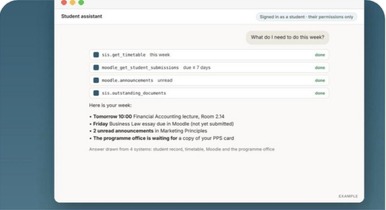
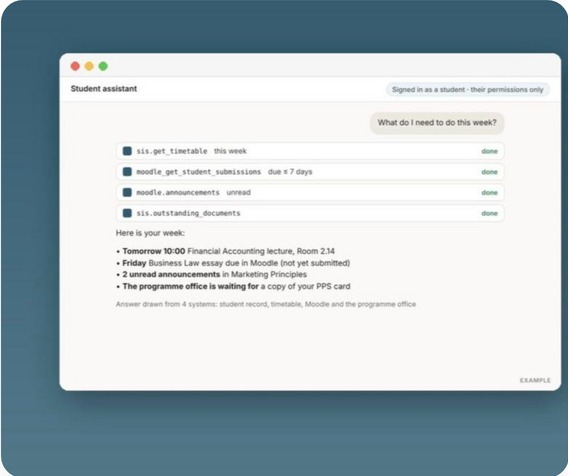
A student assistant answering what a student needs to do this week from four systems
A student asks what they need to do this week and gets one answer drawn from four systems, within their own permissions. Example.

Fixed price

Start with an AI Readiness Assessment

A few days with IT and student services.

  • Your systems, data and access paths mapped
  • Ten use cases ranked by value, difficulty and data risk
  • One recommended pilot, with a scope and a cost
  • The governance questions answered before anyone asks them

On Moodle, a read-only tenant against a copy of your site takes days, not months, and shows whether staff use it, which questions it answers well and which tools you would switch on next.

  • PilotThree or four systems, one group of users, logging and evaluation built in
  • ProductionIdentity, permissions, audit, monitoring and vendor choice
  • Managed AIWe run it, measure it and keep it within your policy

Works with the platforms you are already buying: OpenAI, Anthropic, Microsoft and Salesforce Agentforce.

Book an AI Readiness Assessment →AI for Higher Education

In practice

A student asks what they need to do this week and gets one answer drawn from four systems:

  • A lecture tomorrow at 10:00
  • An assignment due on Friday
  • Two unread announcements in Moodle
  • A document the programme office is waiting for

The same model works for academics and support staff.

"Inneall are very solutions driven. They find better ways of doing things.
I can throw an idea at them and they'll find a way to do it."
EO
Edward OrmondeHead of IT, Dublin Business School
Talk to us →

FAQ

Questions about AI
at Inneall.

Can't see yours? Talk to us.

Is Lugh a person?

No. Lugh is an AI agent: a Python application on one small server in our AWS account, with his own Jira login and email address. Every reply he sends says plainly that he is an AI-powered member of our support team, and a colleague can take any ticket back by reassigning it.

Can the Ops Agent change production on its own?

Only in one narrow case. It investigates freely, but changes run only from a frozen plan a person has approved in Slack, and Approve never goes back to the model. The exception is a class of low-risk Systems Manager repairs on a site that is still down, which run after ten minutes if nobody objects. Nothing touching git, pipelines, databases, DNS, IAM, secrets or server lifecycle qualifies.

Does the AI get access to our database?

No. Our connectors give an assistant a short list of named tools, each with its own key and audit log. On Moodle, the connector uses a normal web-service user with only the functions your college enables, never a site administrator, and a tool that is not on the allow-list is refused.

Where is our data held and how is it protected?

Systems we host run in AWS in Ireland, or inside your own AWS or Azure account. Tools read from the system of record at the moment they are asked; nothing is copied into the assistant. We sign a data processing agreement with every client and are working towards ISO/IEC 27001.

Which AI platforms do you work with?

The ones you are already buying: OpenAI, Anthropic, Microsoft and Salesforce Agentforce. The integration layer, the approvals and the deny lists stay the same whichever model is behind them.

Will you publish results?

We will publish measured results as we have them, not before.

How do we start?

Start with an AI Readiness Assessment: a few days with IT and student services, ten use cases ranked and one costed pilot, at a fixed price.

For your college

AI that can use your
systems, within your
permissions.

Start with an AI Readiness Assessment: ten use cases ranked and
one costed pilot, at a fixed price.

Integrators for specialised education and CRM platforms

  • Moodle
  • Salesforce
  • Zoho
  • HubSpot
  • Sitefinity
  • Celcat
  • Microsoft 365
  • AWS

Built for ourselves first,
which is how we know it works
software developer

A real ticket, answered by Lugh

A college reported a Moodle user locked out after a long module reuse. Lugh went into the live system, found the stuck session, cleared it and replied. Names changed; nothing else.

"Hi Aoife, a lecturer was stuck after a long module reuse on a test course, which left her Moodle session locked so she could not get back in. I have cleared that stuck session and checked that her account is active and the login page is working. Can you give that another try now?

Lugh, Service Desk, Inneall. Lugh is an AI-powered member of our support team."

His internal note on the same ticket, written for our engineers: cause, certainty 92%, verification that the login page returned 200 and single sign-on redirected, what was changed, and the three ISO procedures he checked first. On a different ticket he recognised a request for new automated emails as a change rather than a fault, said so to the customer, and sent the account manager a four-line note: "Change, not a fault. Size: days. No work until the client approves."

Read the Lugh case study

What is running today

Colleges ask us whether AI can work safely with the systems they already run. Rather than answer with slides, we built it for ourselves first. Everything below is live in our own operation.

What this means for your college
strategic consulting

What the Ops Agent posted this week

Straight from our operations channel. Site names are ours or anonymised.

  • Daily fleet sweep, 06:31 UTC. "Checked 31 ECS services, 13 hosts, 46 log groups. 3 issues, 1 critical." Then one line per issue, and at the end: "Read-only sweep. Nothing was changed."
  • Action needed, moodle.inneall.net. "What we saw: zone SSL changed to Flexible, so the CDN originates over HTTP and the HTTPS redirect loops. Suggested action: point the HTTP listener at the healthy blue target group." Then: "Needs a human Approve. This will not run on its own."
  • Recovered, Pingdom DOWN, www.inneall.ie. "Findings and evidence are in the thread." No model was called; the 75-second re-check found the site back.
  • And when it was not sure: "I refused to ask for approval because the independent plan review failed closed." That line is the whole design in one sentence.
Read the Ops Agent case study

Connectors: how AI reaches our systems

An AI model is only useful to a college if it can safely use the systems the college runs. We build that access as Model Context Protocol (MCP) servers: small, named tools with their own keys and audit logs, rather than open database access.

  • Moodle MCP. Containerised service on AWS giving an assistant governed access to courses, users and enrolments on a Moodle site, one tenant per key
  • Student systems MCP. Four services on AWS Fargate: a portal orchestrator plus connectors for Salesforce, a student information system and an early-alert system, so one question can be answered across all three
  • Management dashboard MCP. Our internal dashboard (resourcing, pipeline, management actions, timesheets) exposed to Claude so a director can ask questions and record decisions in plain language
  • Website MCP. A plugin inside this Sitefinity site that lets an AI list, edit and publish pages with named keys and a server-side audit log. The pages you are reading were drafted through it
  • Every connector: bearer key per service, least-privilege reads, writes only where explicitly allowed, and the destructive operations refused outright
Connected Campus
AI & Intelligent automation

AI writing our code

Our engineers work with AI coding agents every day, inside the same review and release process as everything else.

  • Both agents above were built with AI coding tools, with 179 automated tests on the Ops Agent alone
  • Each repository carries an agent briefing file, so an assistant reads the same conventions a new engineer would
  • Sixteen operational skills (runbooks for our platform, written once, used by people and agents alike)
  • Infrastructure as code throughout, so an agent's change is a reviewable diff, not a click in a console
  • Everything ships through the same pipelines, with the same approvals, as code a person wrote
Ask us how

Why this matters to a college

Every Irish and UK institution is being sold AI. Very few suppliers can show it running against live systems with real permissions, real audit trails and real limits. We can, because we did it to ourselves before offering it to anyone else. The same connectors, the same approval model and the same deny lists are what we propose for your Moodle, your student record system, your CRM and your service desk.
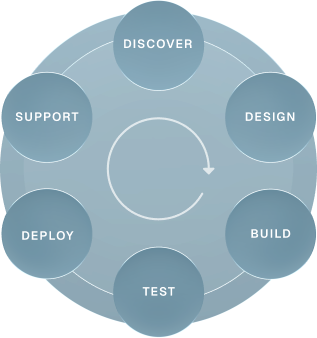
 how-we-do-thingshow-we-do-mobile
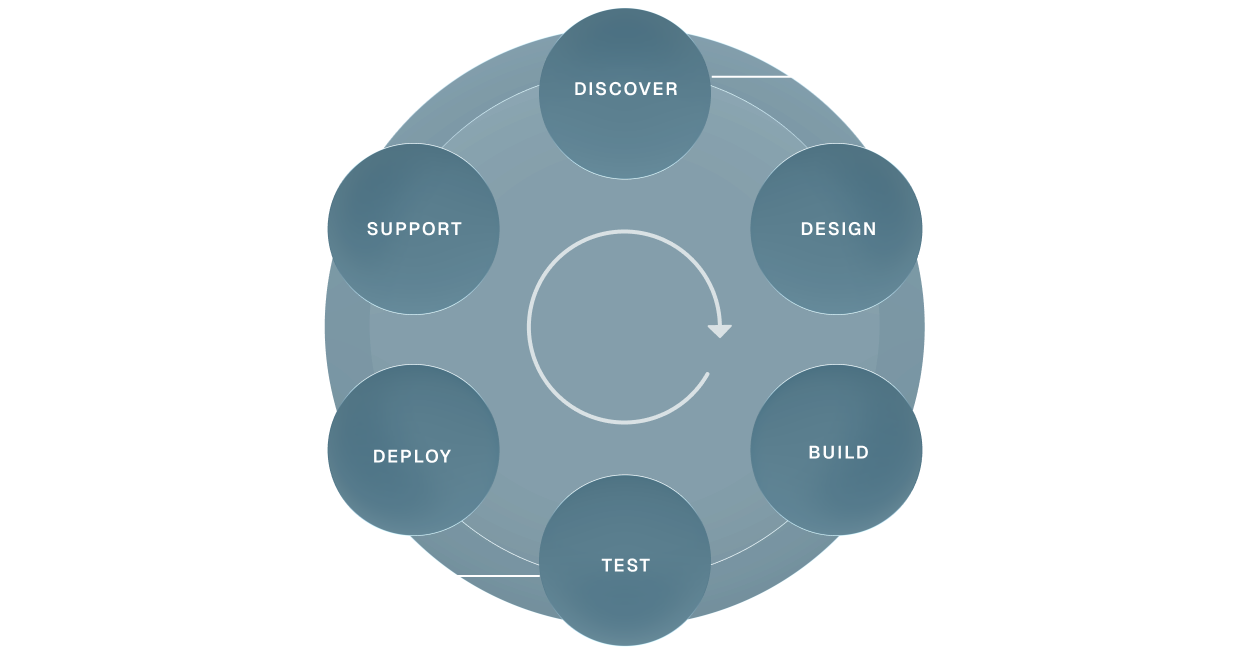
DISCOVER
Audit and workshops
Scope of work
Integration mapping
Risk and dependency analysis
Finalised project plan
DESIGN
User experience
Concept proposals
Stakeholder reviews
Design development
Final specifications
Approval to progress
BUILD
Software development
System integration
Customisations
Content and data migration
Front end interface
TEST
Functional and user acceptance testing
Browser/app performance testing
Accessibility
System and security
DEPLOY
Training
Final configuration and domain go-live
Hypercare in the first weeks
Bug-fix support
Handover to support
SUPPORT
Tailored service level agreements
Responsive support
Planned maintenance
Quality control
Performance tuning

Discover how we think,
deliver and make an impact

View more
Case Studies

A Technology Partnership at the Heart of DBS’s Digital Ambition

Read more
AI at Inneall

Lugh: the AI agent that answers our service desk first

Read more
AI at Inneall

The Ops Agent: how our servers are checked every morning before anyone logs in

Read more

We love API environments
and the challenge of integration

We’ve integrated systems others refused to touch!

“Inneall’s impact on our ability to deliver reliable, scalable technology has been absolutely enormous. What sets them apart is their deep knowledge of our business, they understand our systems, our teams, and our priorities. That means we’re not dealing with a technology supplier; we’re working with a partner who genuinely cares about getting it right.”

Edward Ormonde

Head of IT, Dublin Business School

Frequently Asked Questions

Do you have preferred platforms you always recommend?
We know Moodle, Salesforce, Zoho, Sitefinity and Celcat well because they have proven themselves in colleges. We are not tied to any vendor. We start from what you need and what you already have, and we will tell you plainly if an existing platform is the right answer.
Can you help with the redesign of internal workflows?
Yes. Before we configure or build anything we sit with the people who do the work and map how it actually happens, not how the process document says it happens. We find the duplication and the friction, then design the workflow the technology will support. Better systems on broken processes do not give better outcomes.
Will off the shelf software meet all our needs?
Sometimes, rarely entirely. Established platforms are proven, maintainable and cost effective, but colleges have processes, compliance requirements and integrations that generic software does not cover out of the box. We use the platform where it fits and build the missing pieces where it does not, then connect everything so it works as one system.
How long does a typical project take?
A focused integration or workflow automation can be live in weeks. A full programme across recruitment, student records, learning and reporting usually runs six to twelve months. Every project is broken into short phases so you see working software early and can change direction while it is still cheap to do so.
Where is our data held and how is it protected?
Systems we host run in AWS in Ireland, with backups, monitoring and access controls in place, and we can also run inside your own AWS or Azure account. We sign a data processing agreement with every client. We are working towards ISO/IEC 27001 certification and can share our security practices on request.