Insights / Case studies
Case study Moodle
An AI assistant that can use Moodle, safely.
We built a connector that lets an AI assistant look up a student, see their courses and submissions, find the grading queue, and set up courses and enrolments in Moodle. It never gets a database login. It gets a short list of named tools, a key per college, and a log of everything it does.
SystemMoodle
AccessNamed tools, not a database login
WritesDry run until a person asks
TenantA key and allow-list per college
HostingAWS Ireland
Give the assistant a short list of named tools, not a login to the database
What the assistant can do.
The connector speaks the Model Context Protocol, the open standard that lets AI tools such as Claude call named functions. It sits in front of Moodle’s own web services and exposes a curated set of tools. There is no generic pass-through: if a tool is not on the list, the assistant cannot do it.
- Look up a student by username, email or ID number and see their enrolled courses and completion
- See submission status for every assignment a student is enrolled in
- List a course’s assignments, overdue assignments and the grading queue
- Summarise forum activity and a learner’s recent activity in a course
- Check the site is healthy and search the course catalogue
Writes, with the brakes on.
The second tier of tools can change Moodle: create categories, courses, cohorts and users, enrol users and add cohort members. Every one of them is built so that a mistake is hard to make and easy to see.
- Every write runs as a dry run by default; nothing changes until a person asks for the real run
- Writes are idempotent: asking twice for the same course by its shortname creates it once
- The assistant uses the names people use (shortname, username, ID number); the connector resolves them to Moodle ids
- Each write tool has to be switched on per college; most start with reads only
- Every executed write produces a structured audit line, with secrets removed
Moodle stays in charge.
The connector is a control plane. Moodle remains the source of truth for permissions and data.
- Each college is a tenant with its own API keys, its own allow-list of tools and its own Moodle service token
- The Moodle token is a normal web-service user with only the functions and capabilities the college enables, never a site administrator
- A missing or wrong key is refused before any tool runs; a tool not on the allow-list is refused at the tool layer
- Timeouts, retries and error mapping are handled centrally, and logs record function names and durations, never tokens
- Hosted in AWS Ireland in the same way as our other services
The same pattern for student systems.
Moodle was the first. We have built the same kind of connector for the student systems we run, including Innealla, our own student record system, so an assistant can answer a question that spans several of them.
- Student records: programme details, course enrolments, a financial summary, transactions by period
- Salesforce: accounts, applications, cases and a governed query tool for staff who already have access
- Each tool reads from the system of record at the moment it is asked; nothing is copied into the assistant
- All of it runs as a container service behind a load balancer in our AWS account, with keys per client
- Our own website has one too, which is how this page was published
Where to start.
A read-only tenant against a copy of your Moodle takes days, not months, and answers the questions that matter: whether staff use it, which questions it answers well, and which tools you would switch on next. That is the first step in our fixed-price AI Readiness Assessment. We run this connector against our own Moodle sites first, which is how we know where the edges are.
What it looks like in use.
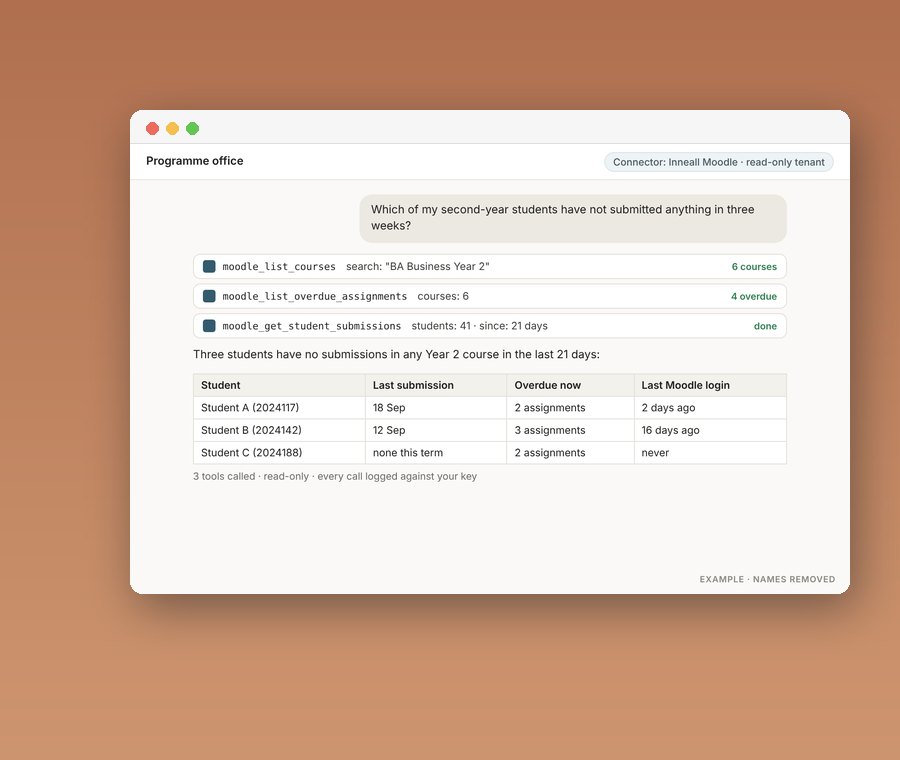
A programme administrator opens Claude, with the college’s connector attached, and types a question.
- “Which of my second-year students have not submitted anything in three weeks?”
- “Set up the September intake courses from this spreadsheet” comes back as a dry run to check before it runs for real
- “Show me the grading queue for the diploma module”
- Each answer names the tool calls it made, so the person can see where every number came from
Do you have preferred platforms you always recommend?
We know Moodle, Salesforce, Zoho, Sitefinity and Celcat well because they have proven themselves in colleges. We are not tied to any vendor. We start from what you need and what you already have, and we will tell you plainly if an existing platform is the right answer.
How long does a typical project take?
A focused integration or workflow automation can be live in weeks. A full programme across recruitment, student records, learning and reporting usually runs six to twelve months. Every project is broken into short phases so you see working software early and can change direction while it is still cheap to do so.
Where is our data held and how is it protected?
Systems we host run in AWS in Ireland, with backups, monitoring and access controls in place, and we can also run inside your own AWS or Azure account. We sign a data processing agreement with every client. We are working towards ISO/IEC 27001 certification and can share our security practices on request.
Can you help with the redesign of internal workflows?
Yes. Before we configure or build anything we sit with the people who do the work and map how it actually happens, not how the process document says it happens. We find the duplication and the friction, then design the workflow the technology will support. Better systems on broken processes do not give better outcomes.
Will off the shelf software meet all our needs?
Sometimes, rarely entirely. Established platforms are proven, maintainable and cost effective, but colleges have processes, compliance requirements and integrations that generic software does not cover out of the box. We use the platform where it fits and build the missing pieces where it does not, then connect everything so it works as one system.
More case studies
Keep reading.
Case studyCase studyCase study
A technology partnership at the heart of DBS's digital ambition
How Dublin Business School and Inneall grew a long-term technology partnership.
Read the case study →Replacing dispersed student data with a student information system
How Chevron College replaced scattered student spreadsheets with a student information system, connected to a new CRM and LMS.
Read the case study →Taking BodySlims global
How BodySlims and Inneall built a mobile-first product partnership for global growth, with an iOS and Android app.
Read the case study →Talk to us
Want a partnership like this?
We are happy to start with a short call and no sales deck. Or begin with a fixed-price review of your Moodle, integrations or student systems.
Integrators for specialised education and CRM platforms
- Moodle
- Salesforce
- Zoho
- HubSpot
- Sitefinity
- Celcat
- Microsoft 365
- AWS
Give the assistant a short list of named tools,
not a login to the database

What the assistant can do
The connector speaks the Model Context Protocol, the open standard that lets AI tools such as Claude call named functions. It sits in front of Moodle’s own web services and exposes a curated set of tools. There is no generic pass-through: if a tool is not on the list, the assistant cannot do it.
- Look up a student by username, email or ID number and see their enrolled courses and completion
- See submission status for every assignment a student is enrolled in
- List a course’s assignments, overdue assignments and the grading queue
- Summarise forum activity and a learner’s recent activity in a course
- Check the site is healthy and search the course catalogue
Writes, with the brakes on
The second tier of tools can change Moodle: create categories, courses, cohorts and users, enrol users and add cohort members. Every one of them is built so that a mistake is hard to make and easy to see.
- Every write runs as a dry run by default; nothing changes until a person asks for the real run
- Writes are idempotent: asking twice for the same course by its shortname creates it once
- The assistant uses the names people use (shortname, username, ID number); the connector resolves them to Moodle ids
- Each write tool has to be switched on per college; most start with reads only
- Every executed write produces a structured audit line, with secrets removed

Moodle stays in charge
The connector is a control plane. Moodle remains the source of truth for permissions and data.
- Each college is a tenant with its own API keys, its own allow-list of tools and its own Moodle service token
- The Moodle token is a normal web-service user with only the functions and capabilities the college enables, never a site administrator
- A missing or wrong key is refused before any tool runs; a tool not on the allow-list is refused at the tool layer
- Timeouts, retries and error mapping are handled centrally, and logs record function names and durations, never tokens
- Hosted in AWS Ireland in the same way as our other services
The same pattern for student systems
Moodle was the first. We have built the same kind of connector for the student systems we run, including Innealla, our own student record system, so an assistant can answer a question that spans several of them.
- Student records: programme details, course enrolments, a financial summary, transactions by period
- Salesforce: accounts, applications, cases and a governed query tool for staff who already have access
- Each tool reads from the system of record at the moment it is asked; nothing is copied into the assistant
- All of it runs as a container service behind a load balancer in our AWS account, with keys per client
- Our own website has one too, which is how this page was published

What it looks like in use
A programme administrator opens Claude, with the college’s connector attached, and types a question.
- “Which of my second-year students have not submitted anything in three weeks?”
- “Set up the September intake courses from this spreadsheet” comes back as a dry run to check before it runs for real
- “Show me the grading queue for the diploma module”
- Each answer names the tool calls it made, so the person can see where every number came from
Where to start
A read-only tenant against a copy of your Moodle takes days, not months, and answers the questions that matter: whether staff use it, which questions it answers well, and which tools you would switch on next. That is the first step in our fixed-price AI Readiness Assessment. We run this connector against our own Moodle sites first, which is how we know where the edges are.
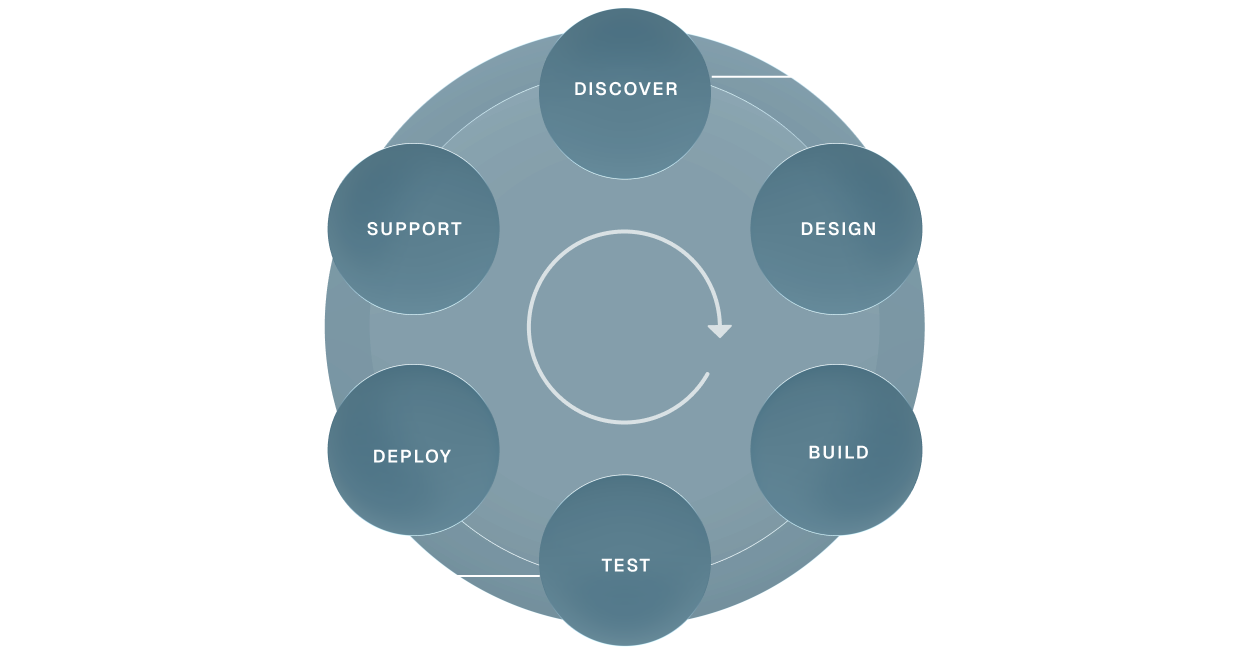
DISCOVER
Audit and workshops
Scope of work
Integration mapping
Risk and dependency analysis
Finalised project plan
Scope of work
Integration mapping
Risk and dependency analysis
Finalised project plan
DESIGN
User experience
Concept proposals
Stakeholder reviews
Design development
Final specifications
Approval to progress
Concept proposals
Stakeholder reviews
Design development
Final specifications
Approval to progress
BUILD
Software development
System integration
Customisations
Content and data migration
Front end interface
System integration
Customisations
Content and data migration
Front end interface
TEST
Functional and user acceptance testing
Browser/app performance testing
Accessibility
System and security
Browser/app performance testing
Accessibility
System and security
DEPLOY
Training
Final configuration and domain go-live
Hypercare in the first weeks
Bug-fix support
Handover to support
Final configuration and domain go-live
Hypercare in the first weeks
Bug-fix support
Handover to support
SUPPORT
Tailored service level agreements
Responsive support
Planned maintenance
Quality control
Performance tuning
Responsive support
Planned maintenance
Quality control
Performance tuning
We love API environments
and the challenge of integration
We’ve integrated systems others refused to touch!
“Inneall’s impact on our ability to deliver reliable, scalable technology has been absolutely enormous. What sets them apart is their deep knowledge of our business, they understand our systems, our teams, and our priorities. That means we’re not dealing with a technology supplier; we’re working with a partner who genuinely cares about getting it right.”

Edward Ormonde
Head of IT, Dublin Business School
Frequently Asked Questions
Do you have preferred platforms you always recommend?
We know Moodle, Salesforce, Zoho, Sitefinity and Celcat well because they have proven themselves in colleges. We are not tied to any vendor. We start from what you need and what you already have, and we will tell you plainly if an existing platform is the right answer.
Can you help with the redesign of internal workflows?
Yes. Before we configure or build anything we sit with the people who do the work and map how it actually happens, not how the process document says it happens. We find the duplication and the friction, then design the workflow the technology will support. Better systems on broken processes do not give better outcomes.
Will off the shelf software meet all our needs?
Sometimes, rarely entirely. Established platforms are proven, maintainable and cost effective, but colleges have processes, compliance requirements and integrations that generic software does not cover out of the box. We use the platform where it fits and build the missing pieces where it does not, then connect everything so it works as one system.
How long does a typical project take?
A focused integration or workflow automation can be live in weeks. A full programme across recruitment, student records, learning and reporting usually runs six to twelve months. Every project is broken into short phases so you see working software early and can change direction while it is still cheap to do so.
Where is our data held and how is it protected?
Systems we host run in AWS in Ireland, with backups, monitoring and access controls in place, and we can also run inside your own AWS or Azure account. We sign a data processing agreement with every client. We are working towards ISO/IEC 27001 certification and can share our security practices on request.