Insights / Case studies
Case study Inneall operations
A night watch for 31 production services.
When a site goes down, the Ops Agent investigates the live estate, writes a frozen list of commands, and waits. Approve means "run exactly this". The model never gets a second turn.
Estate31 production services
WhenEvery morning, and when a site is down
ApproveRun this exact script
VetoTen minutes, one narrow class of repair
SweepRead-only, every morning
Investigate freely. Change only what a person has read.
Why we built it.
We run dozens of client sites on a shared container platform. Outages look identical from the outside and need a different safe fix every time: the wrong container on a shared host, a process out of memory, a deploy still rolling, or nothing at all. The first twenty minutes of every incident was the same work: is it really down, which container, which command, is a pipeline running. We built something to do that work in seconds, so an engineer wakes up to a diagnosis and a plan, not a blank page.
What it does.
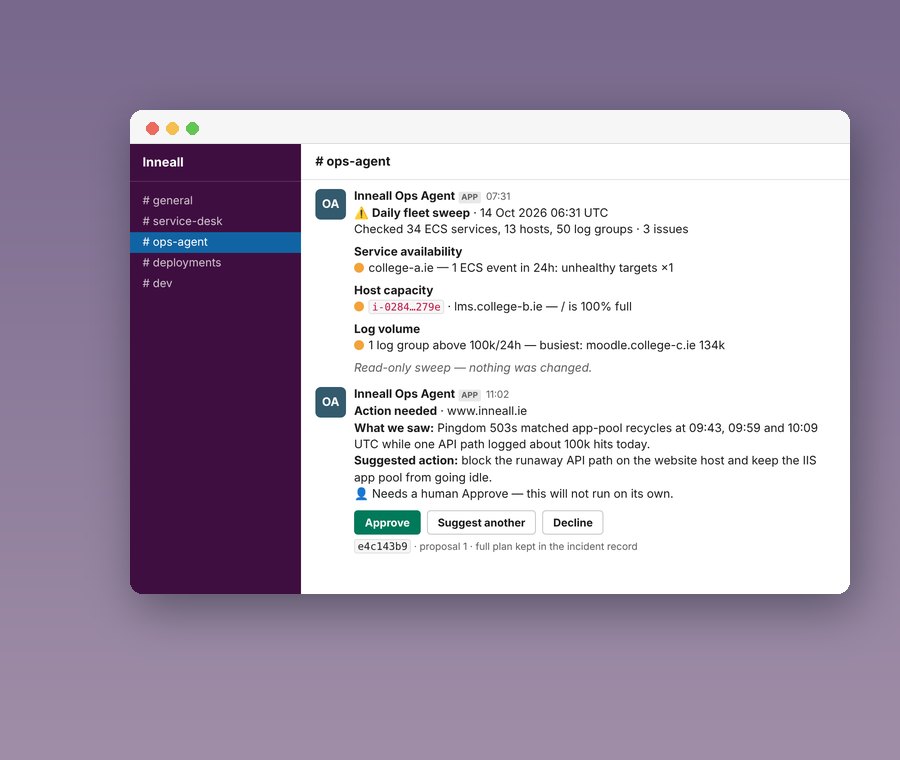
Pingdom says a site is down. Within seconds the agent has acknowledged it in Slack, waited 75 seconds to see whether it was a blip, checked whether a deployment is already rolling, and only then started an investigation against live AWS evidence.
- Reads the containers, load balancers, hosts and logs for the named site, from a map of 31 services
- Explains what it found in a Slack thread, in plain language
- If a fix is justified, writes a frozen plan: up to 16 exact shell commands and up to 8 success checks
- A second model pass, with no tools, must review that plan and return PASS before an Approve button appears
- A person presses Approve. The executor runs the stored commands, stops at the first failure, and checks the result
- Every morning a read-only sweep of the whole fleet posts one exception report. It never repairs
#ops-agent · incident thread · what an engineer sees
moodle.inneall.net
What we saw: load balancer target unhealthy for 4 minutes. The web container on one host is out of memory and has been killed twice.
Suggested action: restart that one container and re-check the health endpoint.
Approve Suggest another action DeclineThe full command list stays on the incident record, not in the channel. If approved, one line reports the outcome.
What it is, and what it is not.
It is deliberately not a chat model with the AWS keys. It is an investigation and proposal tool with hard execution gates, bound to a map of known sites and fenced in by code and policy.
- It is a first responder with hard gates. It is not a replacement for on-call; people still own the judgement calls
- Approve means "run this exact script". It does not mean "use your judgement"
- Most "downs" end as false alarms or deploy blips with no production change at all
- It can run frozen, validated commands on a live container. It cannot rewrite access rights, databases, DNS or secrets, however it is asked
- It is bound to a service map and our own operational skills. It is not a general assistant over the account
- Backed by 179 automated tests across approval policy, the executor, queue routing, plan review, deploy watch and recovery
Approve never re-enters the model.
This is the design rule everything else follows. The Approve button is bound to the incident, the proposal round and a hash of the plan. Execution is a plain bash runner over the stored list. There is no step where the AI reinterprets "yes".
- Validated deterministically, then preflighted against the live system, then independently reviewed, before anyone sees a button
- Only configured Slack accounts can approve. Everyone else is ignored for anything that changes production
- A deny list runs again at execution time: no forced deployments, no destructive patterns
- "Suggest another action" forces a new proposal, capped so it cannot loop
The ten-minute veto.
A person can approve immediately in Slack; if nobody answers within ten minutes, the frozen plan runs. This applies to one narrow class of repair only: the site is still down, the plan is low risk, it uses only Systems Manager commands, and both the review and the live preflight passed. Then the agent waits ten minutes from first detection, reminds at five, and acts if nobody has objected.
- Nothing that touches git, pipelines, databases, DNS, IAM, secrets or server lifecycle qualifies
- The clock starts at detection, not when the card was posted
- Most incidents never get this far. They end as false alarms or deploy blips with no production change
- The IAM role denies the dangerous actions outright, so the policy is a second line of defence, not the only one
What we learned.
The interesting engineering was not the model. It was everything around it.
- Confirm before you think: a 75-second re-check kills most alerts before any model is called
- Watch deploys: never repair a service while a pipeline is rolling
- Separate the queues: operators should get "status" back in a second
- Freeze the plan: the thing a person approves must be the thing that runs
- Keep evidence off the channel: one outcome line in Slack, the full command record on the incident
- The worker costs tens of dollars a month. Model spend is capped by the plan and fails closed, never silently
Do you have preferred platforms you always recommend?
We know Moodle, Salesforce, Zoho, Sitefinity and Celcat well because they have proven themselves in colleges. We are not tied to any vendor. We start from what you need and what you already have, and we will tell you plainly if an existing platform is the right answer.
How long does a typical project take?
A focused integration or workflow automation can be live in weeks. A full programme across recruitment, student records, learning and reporting usually runs six to twelve months. Every project is broken into short phases so you see working software early and can change direction while it is still cheap to do so.
Where is our data held and how is it protected?
Systems we host run in AWS in Ireland, with backups, monitoring and access controls in place, and we can also run inside your own AWS or Azure account. We sign a data processing agreement with every client. We are working towards ISO/IEC 27001 certification and can share our security practices on request.
Can you help with the redesign of internal workflows?
Yes. Before we configure or build anything we sit with the people who do the work and map how it actually happens, not how the process document says it happens. We find the duplication and the friction, then design the workflow the technology will support. Better systems on broken processes do not give better outcomes.
Will off the shelf software meet all our needs?
Sometimes, rarely entirely. Established platforms are proven, maintainable and cost effective, but colleges have processes, compliance requirements and integrations that generic software does not cover out of the box. We use the platform where it fits and build the missing pieces where it does not, then connect everything so it works as one system.
More case studies
Keep reading.
Case studyCase studyCase study
A technology partnership at the heart of DBS's digital ambition
How Dublin Business School and Inneall grew a long-term technology partnership.
Read the case study →Replacing dispersed student data with a student information system
How Chevron College replaced scattered student spreadsheets with a student information system, connected to a new CRM and LMS.
Read the case study →Taking BodySlims global
How BodySlims and Inneall built a mobile-first product partnership for global growth, with an iOS and Android app.
Read the case study →Talk to us
Want a partnership like this?
We are happy to start with a short call and no sales deck. Or begin with a fixed-price review of your Moodle, integrations or student systems.
Integrators for specialised education and CRM platforms
- Moodle
- Salesforce
- Zoho
- HubSpot
- Sitefinity
- Celcat
- Microsoft 365
- AWS
Investigate freely.
Change only what a person has read.
Approve never re-enters the model
This is the design rule everything else follows. The Approve button is bound to the incident, the proposal round and a hash of the plan. Execution is a plain bash runner over the stored list. There is no step where the AI reinterprets "yes".
- Validated deterministically, then preflighted against the live system, then independently reviewed, before anyone sees a button
- Only configured Slack accounts can approve. Everyone else is ignored for anything that changes production
- A deny list runs again at execution time: no forced deployments, no destructive patterns
- "Suggest another action" forces a new proposal, capped so it cannot loop
What it does
Pingdom says a site is down. Within seconds the agent has acknowledged it in Slack, waited 75 seconds to see whether it was a blip, checked whether a deployment is already rolling, and only then started an investigation against live AWS evidence.
- Reads the containers, load balancers, hosts and logs for the named site, from a map of 31 services
- Explains what it found in a Slack thread, in plain language
- If a fix is justified, writes a frozen plan: up to 16 exact shell commands and up to 8 success checks
- A second model pass, with no tools, must review that plan and return PASS before an Approve button appears
- A person presses Approve. The executor runs the stored commands, stops at the first failure, and checks the result
- Every morning a read-only sweep of the whole fleet posts one exception report. It never repairs
#ops-agent · incident thread · what an engineer sees
moodle.inneall.net
What we saw: load balancer target unhealthy for 4 minutes. The web container on one host is out of memory and has been killed twice.
Suggested action: restart that one container and re-check the health endpoint.
Approve Suggest another action DeclineThe full command list stays on the incident record, not in the channel. If approved, one line reports the outcome.
The ten-minute veto
A person can approve immediately in Slack; if nobody answers within ten minutes, the frozen plan runs. This applies to one narrow class of repair only: the site is still down, the plan is low risk, it uses only Systems Manager commands, and both the review and the live preflight passed. Then the agent waits ten minutes from first detection, reminds at five, and acts if nobody has objected.
- Nothing that touches git, pipelines, databases, DNS, IAM, secrets or server lifecycle qualifies
- The clock starts at detection, not when the card was posted
- Most incidents never get this far. They end as false alarms or deploy blips with no production change
- The IAM role denies the dangerous actions outright, so the policy is a second line of defence, not the only one
What it is, and what it is not
It is deliberately not a chat model with the AWS keys. It is an investigation and proposal tool with hard execution gates, bound to a map of known sites and fenced in by code and policy.
- It is a first responder with hard gates. It is not a replacement for on-call; people still own the judgement calls
- Approve means "run this exact script". It does not mean "use your judgement"
- Most "downs" end as false alarms or deploy blips with no production change at all
- It can run frozen, validated commands on a live container. It cannot rewrite access rights, databases, DNS or secrets, however it is asked
- It is bound to a service map and our own operational skills. It is not a general assistant over the account
- Backed by 179 automated tests across approval policy, the executor, queue routing, plan review, deploy watch and recovery

What we learned
The interesting engineering was not the model. It was everything around it.
- Confirm before you think: a 75-second re-check kills most alerts before any model is called
- Watch deploys: never repair a service while a pipeline is rolling
- Separate the queues: operators should get "status" back in a second
- Freeze the plan: the thing a person approves must be the thing that runs
- Keep evidence off the channel: one outcome line in Slack, the full command record on the incident
- The worker costs tens of dollars a month. Model spend is capped by the plan and fails closed, never silently
Why we built it
We run dozens of client sites on a shared container platform. Outages look identical from the outside and need a different safe fix every time: the wrong container on a shared host, a process out of memory, a deploy still rolling, or nothing at all. The first twenty minutes of every incident was the same work: is it really down, which container, which command, is a pipeline running. We built something to do that work in seconds, so an engineer wakes up to a diagnosis and a plan, not a blank page.
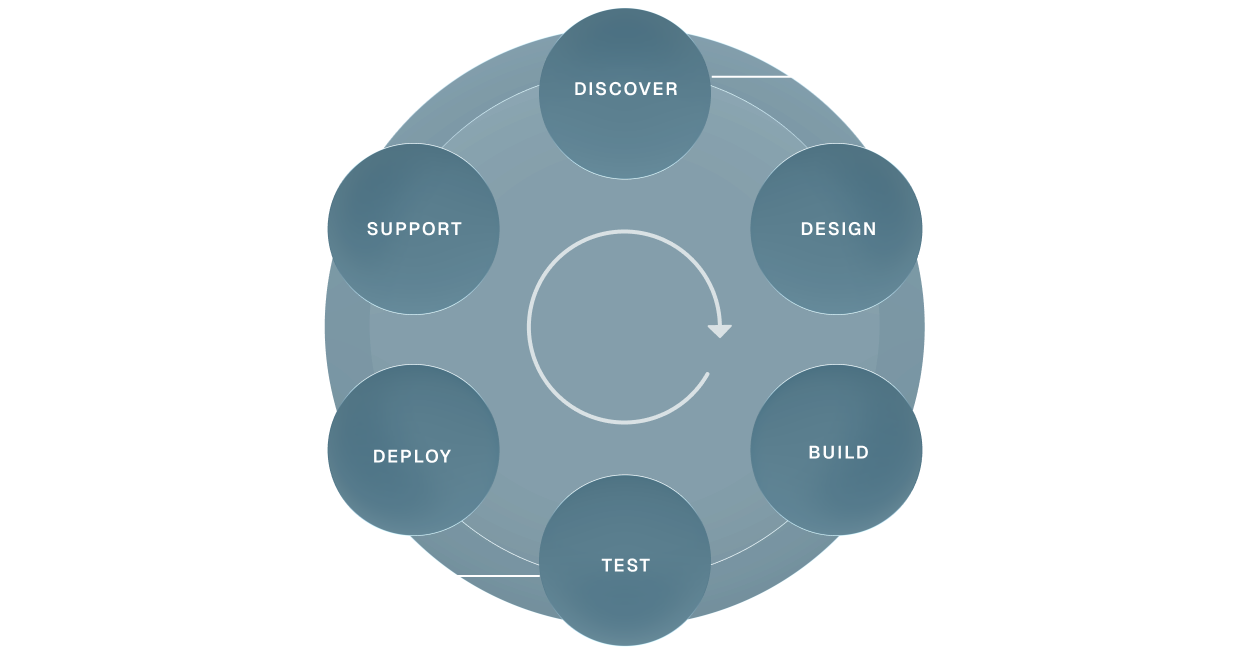
DISCOVER
Audit and workshops
Scope of work
Integration mapping
Risk and dependency analysis
Finalised project plan
Scope of work
Integration mapping
Risk and dependency analysis
Finalised project plan
DESIGN
User experience
Concept proposals
Stakeholder reviews
Design development
Final specifications
Approval to progress
Concept proposals
Stakeholder reviews
Design development
Final specifications
Approval to progress
BUILD
Software development
System integration
Customisations
Content and data migration
Front end interface
System integration
Customisations
Content and data migration
Front end interface
TEST
Functional and user acceptance testing
Browser/app performance testing
Accessibility
System and security
Browser/app performance testing
Accessibility
System and security
DEPLOY
Training
Final configuration and domain go-live
Hypercare in the first weeks
Bug-fix support
Handover to support
Final configuration and domain go-live
Hypercare in the first weeks
Bug-fix support
Handover to support
SUPPORT
Tailored service level agreements
Responsive support
Planned maintenance
Quality control
Performance tuning
Responsive support
Planned maintenance
Quality control
Performance tuning
We love API environments
and the challenge of integration
We’ve integrated systems others refused to touch!
“Inneall’s impact on our ability to deliver reliable, scalable technology has been absolutely enormous. What sets them apart is their deep knowledge of our business, they understand our systems, our teams, and our priorities. That means we’re not dealing with a technology supplier; we’re working with a partner who genuinely cares about getting it right.”

Edward Ormonde
Head of IT, Dublin Business School
Frequently Asked Questions
Do you have preferred platforms you always recommend?
We know Moodle, Salesforce, Zoho, Sitefinity and Celcat well because they have proven themselves in colleges. We are not tied to any vendor. We start from what you need and what you already have, and we will tell you plainly if an existing platform is the right answer.
Can you help with the redesign of internal workflows?
Yes. Before we configure or build anything we sit with the people who do the work and map how it actually happens, not how the process document says it happens. We find the duplication and the friction, then design the workflow the technology will support. Better systems on broken processes do not give better outcomes.
Will off the shelf software meet all our needs?
Sometimes, rarely entirely. Established platforms are proven, maintainable and cost effective, but colleges have processes, compliance requirements and integrations that generic software does not cover out of the box. We use the platform where it fits and build the missing pieces where it does not, then connect everything so it works as one system.
How long does a typical project take?
A focused integration or workflow automation can be live in weeks. A full programme across recruitment, student records, learning and reporting usually runs six to twelve months. Every project is broken into short phases so you see working software early and can change direction while it is still cheap to do so.
Where is our data held and how is it protected?
Systems we host run in AWS in Ireland, with backups, monitoring and access controls in place, and we can also run inside your own AWS or Azure account. We sign a data processing agreement with every client. We are working towards ISO/IEC 27001 certification and can share our security practices on request.